/e/OS guide: honest review, supported phones and install
The gentlest way off Google: degoogled Android with microG, a privacy-scoring app store and its own cloud, on hundreds of phones or preinstalled.
- Install effort
- Easy · installer app, or preinstalled
- Apps and Google
- microG built in + App Lounge
- Relock bootloader
- Some devices
- Phones in our database
- 22 model groups
/e/OS is a free, open-source Android system from the e Foundation, a non-profit, built on LineageOS. It removes Google’s apps and services and replaces them with friendlier, privacy-minded versions: microG for apps that expect Google, an app store that shows each app’s trackers, a dashboard for blocking trackers and hiding your location, and an optional free cloud account. Its sister company Murena sells phones with /e/OS already installed.
The aim is comfort first. /e/OS looks and feels like a mainstream phone, with a simple home screen and familiar default apps, and you never have to touch a command line if you buy a Murena phone. That makes it a popular first step for people leaving an iPhone or a stock Android phone, and for families who want privacy without a learning curve.
Our /e/OS review is honest about the trade-off: it protects you well from everyday tracking, but it isn’t hardened like GrapheneOS, and on many devices the bootloader can’t be locked again. The current release is /e/OS 4.4.2, published on October 30, 2026, with builds on Android 14, 15 and 16. Below are its pros and cons, the phones it runs on, how the install works and what breaks.
/e/OS at a glance
| Based on | LineageOS / AOSP; current builds on Android 14, 15 and 16 |
|---|---|
| Made by | The e Foundation, a non-profit; phones and cloud sold by Murena |
| Current release | /e/OS 4.4.2 (October 30, 2026) |
| Supported devices | 287 official devices across 27 brands |
| Google services | microG built in |
| Price | Free; Murena sells phones with it preinstalled |
| Website | e.foundation |
| App compatibility | microG built in, plus the App Lounge store that shows each app's trackers |
| Updates | Monthly from the /e/ Foundation; Murena phones update over the air |
What /e/OS does for your privacy
Advanced Privacy dashboard
A widget lets you block trackers inside apps, fake your location for apps that don’t need it, and hide your IP address. You can turn each one on or off per app.
App Lounge with privacy scores
The built-in store offers Play Store apps without a Google account, open-source apps and web apps, and shows a privacy score and the trackers found in each app before you install it.
microG built in
microG, an open-source stand-in for Google Play services, comes preinstalled, so push notifications and most mainstream apps work without Google’s own services.
Murena Workspace cloud
An optional free account with a @murena.io address and 1 GB of storage syncs email, contacts, calendar, notes and photos, like a private alternative to Google’s account.
Preinstalled phones
Murena sells phones that arrive with /e/OS, including the Fairphone (Gen. 6), SHIFTphone 8, Gigaset GS6 and refurbished Pixel 8, so there’s nothing to flash.
Browser-based installer
For phones you already own, the /e/OS Installer runs in a Chromium-based browser such as Edge or Chromium and walks you through each step.
What breaks, and what still works
Google Wallet tap-to-pay
Google Wallet doesn’t work. Contactless is a standard Android feature, though, so Curve Pay (UK and EEA), PayPal and many European bank apps can still pay by tap.
Some banking apps
Most banking apps run with microG, but apps that require Google’s certification refuse. On community builds with an unlocked bootloader, more apps complain. Test your bank first.
Android Auto
microG doesn’t officially support Android Auto. Workarounds reported on the /e/OS forum need root and tend to break with updates.
Security on community builds
Many of the 287 devices are community builds that can’t relock the bootloader and may get updates later. The device list marks each one as lockable or not.
/e/OS pros and cons
Phones to buy for /e/OS
Each of these runs /e/OS with official support. Amazon prices change daily, so we show a price band; maker-shop phones show the maker's list price.
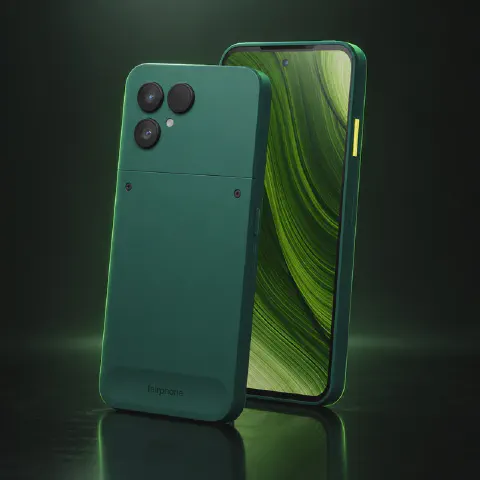
/e/OS preinstalled · repairable · no flashing needed
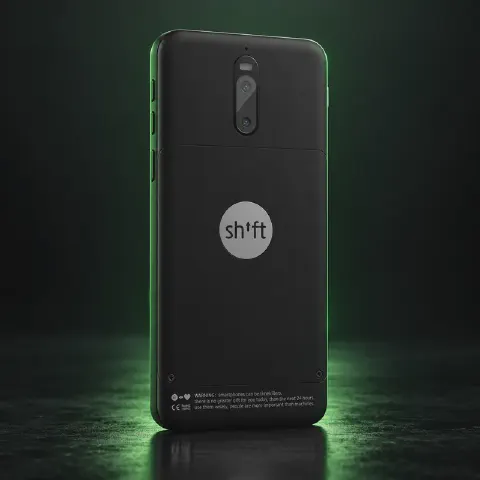
Modular, repairable · now SHIFTphone 8.1 · CalyxOS, iodéOS, /e/OS · ~12-week delivery
Which phones support /e/OS?
The /e/OS device list counts 287 officially supported devices from 27 brands, including Google Pixels, Fairphones, OnePlus, Sony Xperia, Samsung, Motorola, Nothing, Xiaomi and Murena's own phones. Each entry says whether it's an official build that can relock the bootloader or a community build that can't, so check that before you choose. If you'd rather skip installing, Murena sells phones with /e/OS on board, with US and European shops. The table below shows the models in our database.
| Brand | Model | Support note |
|---|---|---|
| Google Pixel | Pixel 9a | Community build (bootloader stays unlocked) |
| Google Pixel | Pixel 9 / 9 Pro / Pro XL / Pro Fold | Whole 9 family supported |
| Google Pixel | Pixel 8 / 8 Pro / 8a | Supported — check the device selector |
| Google Pixel | Pixel 7 / 7 Pro / 7a | Supported |
| Google Pixel | Pixel 6 / 6 Pro / 6a | Supported |
| Google Pixel | Pixel 5 or older | Many older Pixels supported |
| Fairphone | Fairphone (Gen. 6) | Preinstalled on the Murena edition |
| Fairphone | Fairphone 5 | Official build, easy installer |
| Fairphone | Fairphone 4 | Supported — easy installer |
| Motorola | Other Moto G models | Many Moto G models supported |
| OnePlus | OnePlus 13 / 13R / 12 | Community builds for 13 / 12 |
| OnePlus | OnePlus 11 / 10 series | Several models supported |
| OnePlus | Nord series | Check the device selector |
| Nothing | Nothing Phone (1) / Phone (2) | Phone (1) and (2) supported |
| Nothing | CMF Phone 1 | Officially supported |
| Sony | Xperia 1 / 5 / 10 series | Xperia 1 II–V, 5 II–V, 10–10 V |
| Samsung | Galaxy S series (international) | Many international S models (S9–S21) |
| Samsung | Galaxy A series | Many international A models |
| Xiaomi / Poco | Xiaomi 13 / 14 / Redmi Note | Many Redmi models supported |
| SHIFT | SHIFTphone 8 | Official · also sold preinstalled by Murena |
| Murena | Murena One / Two | Preinstalled |
| Other / not sure | Not sure of my model | Search the device selector |
Not sure about your exact model? Look up your phone or open the official /e/OS device list.
How to install /e/OS
What you need: For a phone you already own: a computer with a Chromium-based browser (Chrome, Edge or Opera) and a USB cable. The /e/OS Installer runs in the browser for many models; others use a command-line guide on the device's page. Installing erases the phone.
- Look up your exact model on the /e/OS device list and check whether it supports the /e/OS Installer.
- Open the /e/OS Installer in a Chromium-based browser (or download the build and guide from the device page).
- Turn on Developer options, USB debugging and OEM unlocking on the phone, and connect it.
- Follow the installer's screens: it unlocks, flashes /e/OS and, where possible, relocks the bootloader.
- Set up the phone. A Murena account is optional; you can skip it.
/e/OS vs the alternatives
Pick GrapheneOS if you have a Pixel and want the strongest protection and the best banking-app support. It asks a little more of you during setup.
Pick iodéOS if you like the /e/OS idea but want a stronger built-in tracker and ad blocker, also sold preinstalled.
Pick CalyxOS for a budget Motorola or Fairphone with a relocked bootloader, a built-in firewall and fewer extras.
Every system side by side: the feature table and how the privacy scores work.
Who /e/OS is for
/e/OS is for people who want to leave Google without becoming a tinkerer: switchers from iPhone, parents setting up a family phone, and anyone who wants their mail, calendar and photos in one private account. Buying a Murena phone is the easiest path, because it arrives ready and updates over the air. If you want maximum security, or you rely on a strict banking app, GrapheneOS on a Pixel is the better choice. If you're installing it yourself, pick a device the list marks as lockable.
/e/OS FAQ
Is /e/OS good for privacy?
Yes, for everyday tracking: no Google apps, microG instead of Google's services, tracker blocking in Advanced Privacy and privacy scores in App Lounge. It isn't as hardened as GrapheneOS, and on community builds the bootloader stays unlocked.
Which phones support /e/OS?
The official device list counts 287 devices from 27 brands, including Pixels, Fairphones, OnePlus, Sony Xperia, Samsung, Motorola and Nothing phones. Murena also sells the Fairphone (Gen. 6), SHIFTphone 8, Gigaset GS6 and refurbished Pixel 8 with /e/OS preinstalled.
Do I need a Murena account to use /e/OS?
No. The Murena Workspace account is optional. It gives you a @murena.io address and 1 GB of free cloud storage, but you can skip it during setup and use the phone without any account.
Do banking apps work on /e/OS?
Most do with microG, but apps that require Google's certification refuse, and Google Wallet doesn't work. Community builds with unlocked bootloaders cause more failures, so test your bank's app first.
What is the latest /e/OS version?
/e/OS 4.4.2, released on October 30, 2026, with builds based on Android 14, 15 and 16 depending on the device.
Can I install /e/OS on the phone I already own?
If your model is on the official device list, yes. Open its page, check whether it's marked lockable, then use the browser-based /e/OS Installer or the device's command-line guide. Installing erases the phone, so back up your photos and contacts first.
Is /e/OS or GrapheneOS better?
GrapheneOS is more secure and better with banking apps, but it runs only on Pixels. /e/OS runs on hundreds of phones, comes preinstalled from Murena and is friendlier for beginners.
Sources
- e Foundation: /e/OS overview
- /e/OS supported devices (287)
- /e/OS release notes (4.4.2)
- /e/OS Installer
- AlternativeTo: /e/OS 3.0 with tablet mode and parental control
- /e/OS community: Android Auto with /e/
Facts come from the /e/OS project and device makers, checked November 6, 2026. Spotted something out of date? Send us a correction.