GrapheneOS guide: supported phones, install and what breaks
The most hardened Android you can install today, on Google Pixel phones, with Google Play only if you want it.
- Install effort
- Easy · web installer, ~20 min
- Apps and Google
- Sandboxed Google Play, optional
- Relock bootloader
- Yes
- Phones in our database
- 7 model groups
GrapheneOS is a free, open-source version of Android built for privacy and security. It starts from the same Android code Google publishes, removes every Google app and service, and then adds protections that stock Android doesn’t have: a hardened memory allocator, stricter app sandboxing, extra permission switches and faster security fixes. The project is a non-profit funded by donations, and it says it will stay that way.
The catch is hardware. GrapheneOS only supports phones that meet its security bar, and today that means Google Pixels: the Pixel 6 through the Pixel 10 series, plus the Pixel Fold and Pixel Tablet. Motorola is the first other brand on the way. GrapheneOS confirmed in September 2026 that the Motorola Signature 27 will be its first non-Pixel phone, but there are no builds for it yet.
Installing it is easier than its reputation. An official web installer runs in Chrome, Edge or Brave, takes about 20 minutes, and locks the bootloader again at the end, so verified boot keeps protecting the phone. If you need banking apps or other Play-only apps, you can add Google Play as an ordinary sandboxed app with no special access. This page covers the pros and cons, the supported phones, the install and the things that still break.
GrapheneOS at a glance
| Based on | Android Open Source Project (AOSP), Android 17 |
|---|---|
| Made by | The GrapheneOS project, a non-profit funded by donations |
| Current release | 2026110200 (November 2026) |
| Supported phones | Google Pixel 6 through Pixel 10 series, Pixel Fold, Pixel Tablet |
| Coming next | Motorola Signature 27 (confirmed, no builds yet) |
| Price | Free and open source |
| Website | grapheneos.org |
| App compatibility | Sandboxed Google Play, optional: runs as an ordinary app with no special access |
| Updates | From the GrapheneOS project, usually within days of Google's monthly patches |
What GrapheneOS does for your privacy
No Google by default
A fresh install has no Google apps, no Google services and no Google account. Nothing talks to Google unless you install something that does.
Sandboxed Google Play, if you want it
Google Play can be installed from GrapheneOS’s own app store as a regular app. The project says it ‘receives absolutely no special access or privileges’, and it only exists in the profile where you install it.
Network and Sensors switches
Every app gets a Network permission you can switch off, plus a Sensors permission for the accelerometer, compass and similar hardware. Stock Android has neither.
Storage Scopes and Contact Scopes
Apps that demand your files or contacts can be handed only the folders or people you pick, instead of everything. The app thinks it got full access.
Hardened memory and exploit protection
GrapheneOS ships its own hardened_malloc allocator and uses hardware memory tagging on Pixel 8 and newer, which catches the memory bugs most phone exploits rely on.
Locked bootloader and verified boot
After install the bootloader is locked again, so the phone checks that the system hasn’t been tampered with every time it starts. The built-in Auditor app can verify this from a second phone.
Auto reboot and a duress PIN
The phone can restart itself after a set time locked, which puts data back into its strongest encrypted state. A duress PIN wipes the phone if someone forces you to unlock it.
Profiles to keep apps apart
Separate user profiles, plus Android’s Private Space, let you keep work apps, banking apps or Google Play in their own walled-off area.
What breaks, and what still works
Google Wallet tap-to-pay
Google Wallet won’t work, because Google only allows it on Google-certified systems. Contactless itself is a standard Android feature, so Curve Pay (UK and EEA), PayPal and many European bank apps can pay by tap instead.
A few strict banking apps
GrapheneOS passes the basic integrity check but isn’t certified by Google, and the project doesn’t try to fake it. Most banking apps run with sandboxed Google Play; a minority that demand Google certification refuse. Check the GrapheneOS forum for your bank before you switch.
Android Auto needs a setting
Android Auto works with the official app, but it needs extra access that GrapheneOS only grants after you turn it on in the sandboxed Google Play settings.
Some Google-only features
Google Assistant and the Pixel features that are built into Google’s own system image don’t carry over, because GrapheneOS ships none of Google’s apps. Photos still work: the GrapheneOS camera app is included, and the project says Google Camera can be installed too.
Push notifications without Play
Apps that rely on Google’s push service stay quiet unless you install sandboxed Play. Signal, Molly, Threema and other apps with their own push work without it.
GrapheneOS pros and cons
Phones to buy for GrapheneOS
Each of these runs GrapheneOS with official support. Amazon prices change daily, so we show a price band; maker-shop phones show the maker's list price.
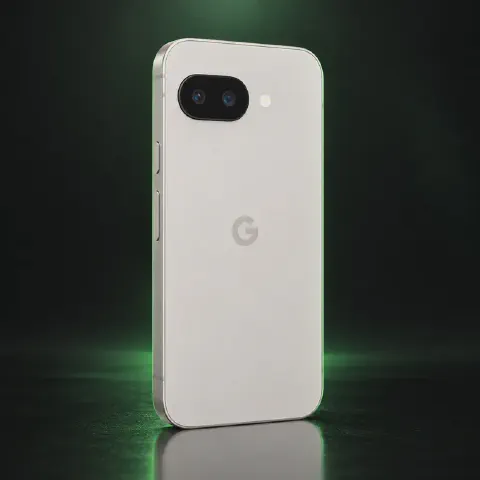
6.3" OLED · updates to April 2032 · GrapheneOS, CalyxOS, iodéOS or LineageOS
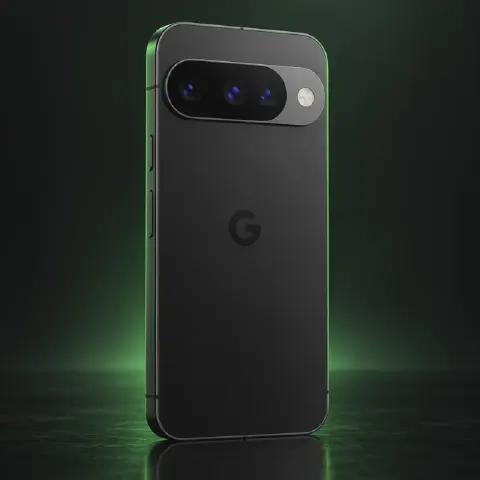
Pixel 9a or Pixel 10 series with GrapheneOS, installed and checked by Nitrokey · ships from EU
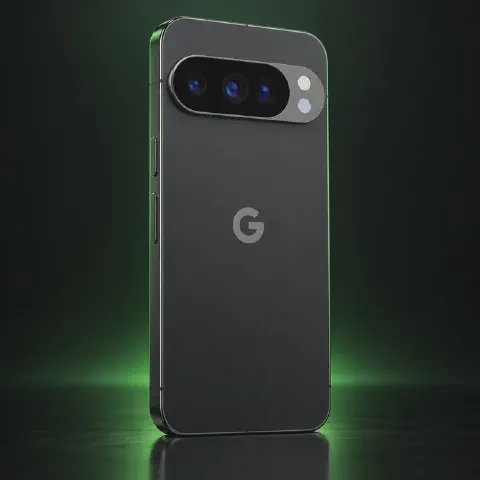
Pixels with GrapheneOS + optional private services bundle · US-based
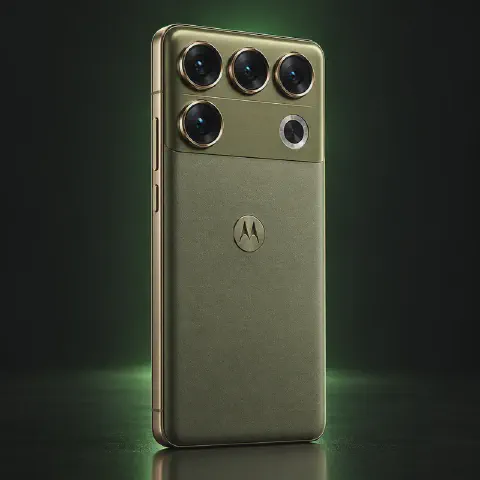
First non-Pixel phone GrapheneOS will support · Snapdragon 8 Elite Extreme Gen 6 · 7 years of updates · US/Canada from Nov 2026
More options in the full degoogled phone catalog.
Which phones support GrapheneOS?
GrapheneOS chooses phones by security features, not popularity. It needs a bootloader that can be locked again with a custom system, a proper secure element, hardware memory tagging and long, reliable firmware updates, and so far only Pixels tick every box. The project recommends buying the Pixel 8 or newer, because those get at least seven years of updates from launch and support memory tagging. Verizon-locked Pixels can't be unlocked, so buy the unlocked model. The Pixel 11 isn't supported: the project says it won't add it unless memory tagging is switched on in its firmware. The table below lists every model in our database.
| Brand | Model | Support note |
|---|---|---|
| Google Pixel | Pixel 10 / 10a / Pro / XL / Pro Fold | Full support since Dec 2025 · updates to Aug 2032+ |
| Google Pixel | Pixel 9a | Recommended device · updates to April 2032 |
| Google Pixel | Pixel 9 / 9 Pro / Pro XL / Pro Fold | Recommended device |
| Google Pixel | Pixel 8 / 8 Pro / 8a | Recommended device · updates to 2030–31 |
| Google Pixel | Pixel 7 / 7 Pro / 7a | Full support · 7a to May 2028 |
| Google Pixel | Pixel 6 / 6 Pro / 6a | Supported · 6a to July 2027 |
| Google Pixel | Pixel Fold (2023) | Officially supported |
Not sure about your exact model? Look up your phone or open the official GrapheneOS device list.
How to install GrapheneOS
What you need: A computer with a Chromium-based browser (Chrome, Edge or Brave), a good USB-C cable, about 20 minutes. Installing erases the phone, so back up first.
- Update the stock Android first, then turn on OEM unlocking: Settings → About phone, tap Build number seven times, then Settings → System → Developer options → OEM unlocking (the phone needs internet once for this).
- Restart into the bootloader: turn the phone off, then hold Volume Down while pressing Power.
- Open the web installer on your computer, connect the phone, and click Unlock bootloader. Confirm on the phone with the volume keys and Power.
- Click Download release, then Flash release, and leave the cable alone until it finishes.
- Click Lock bootloader and confirm on the phone. Start it up, and turn OEM unlocking back off in Developer options.
- Optional: install sandboxed Google Play from GrapheneOS's own App Store if you need banking or other Play-only apps.
GrapheneOS vs the alternatives
Pick CalyxOS if you want a cheap new Motorola or a Fairphone rather than a Pixel, or you prefer microG's lighter Google stand-in. Its security hardening is lighter than GrapheneOS's.
Pick /e/OS if you want to buy a phone with the system already installed, a familiar iPhone-style home screen and a built-in cloud account. It runs on far more phones but trades some security for comfort.
Pick LineageOS if your phone isn't a Pixel and you just want current Android without Google. The bootloader usually stays unlocked, so it protects you less.
Every system side by side: the feature table and how the privacy scores work.
Who GrapheneOS is for
GrapheneOS suits almost anyone who owns, or can buy, a recent unlocked Pixel. If you want the strongest protection without becoming a hobbyist, it's the clear first choice: you install it once in a browser tab and then updates arrive like any phone. Journalists, activists and small businesses handling client data get the most from features like profiles, the duress PIN and auto reboot. It's a harder sell if you rely on Google Wallet every day, need Android Auto to just work without any setting, or want to stay on a non-Pixel phone. In those cases, look at the alternatives above or wait for the Motorola Signature 27.
GrapheneOS FAQ
Which phones does GrapheneOS support?
Google Pixels only for now: Pixel 6, 6 Pro and 6a, the Pixel 7 series, Pixel 8 series, Pixel 9 series and Pixel 10 series including the 10a and 10 Pro Fold, plus the Pixel Fold and Pixel Tablet. The project recommends the Pixel 8 or newer. The Motorola Signature 27 is confirmed as the first non-Pixel phone, but no builds exist yet.
Is GrapheneOS safe to use?
Yes. It is open source, built by a long-running security project, and it keeps verified boot working by locking the bootloader again after install. The project says it is funded by donations and will stay a non-profit, so it has no reason to collect your data.
Do banking apps work on GrapheneOS?
Most do, once sandboxed Google Play is installed. GrapheneOS passes basic integrity checks but isn't certified by Google, and it doesn't try to fake that, so a minority of apps that insist on Google certification refuse to run. The GrapheneOS forum keeps user reports per bank.
Can I use Google Pay or tap-to-pay on GrapheneOS?
Google Wallet won't work, because Google only allows it on certified systems. Tap-to-pay itself is a standard Android feature, so Curve Pay in the UK and EEA, PayPal and many European bank apps can make contactless payments.
How long does it take to install GrapheneOS?
About 20 minutes with the official web installer in Chrome, Edge or Brave, plus time to back up first, because installing erases the phone. You need a computer and a good USB-C cable.
Does Android Auto work on GrapheneOS?
Yes, with the official Android Auto app and sandboxed Google Play. It needs extra access, which you grant in the sandboxed Google Play settings; GrapheneOS doesn't give it by default.
Can I go back to stock Android after installing GrapheneOS?
Yes. Google's Android Flash Tool restores the original software on a Pixel, and GrapheneOS documents how to do it. As with any install, going back erases the phone.
Sources
- GrapheneOS FAQ: supported devices and support dates
- GrapheneOS releases (2026110200)
- GrapheneOS usage guide: sandboxed Google Play, Android Auto, banking
- GrapheneOS features overview
- GrapheneOS web installer
- Motorola: partnership with the GrapheneOS Foundation (MWC 2026)
- 9to5Google: Motorola Signature 27 confirmed to support GrapheneOS
Facts come from the GrapheneOS project and device makers, checked November 6, 2026. Spotted something out of date? Send us a correction.