Sailfish OS guide: phones, Android apps and the licence explained
The independent Linux phone OS from Finland, with an optional Android app layer and no Google underneath.
- Install effort
- Moderate · Sailfish X flasher
- Apps and Google
- Android apps via AppSupport
- Relock bootloader
- No
- Phones in our database
- 2 model groups
Sailfish OS is a Linux-based mobile operating system made by Jolla, a company in Tampere, Finland, that grew out of Nokia’s MeeGo team. It isn’t Android, and it doesn’t contain Google’s apps or services. Its swipe-driven interface is built around app covers you can check and control from the home screen, which still feels unlike anything else on the market.
Sailfish OS 5 is the current generation. Version 5.0 (Tampella) arrived in 2025, Sailfish OS 5.1 (Pispala) followed in June 2026, and 5.2 (Finlayson) shipped first on the new Jolla Phone in July 2026, with other devices getting it once Jolla fixes the remaining issues on older Xperias. In 2026 Jolla also started selling a new Jolla Phone in Europe, alongside the Jolla C2 and the Sailfish X licence for selected Sony Xperia 10 models.
The big practical feature is Android AppSupport. With a Sailfish licence you can install Android apps from stores like Aurora Store or F-Droid, and many of them run normally. Without Google Play Services, though, some apps fail, so, put simply, Sailfish OS works best for people whose must-have apps are known to run on it.
Sailfish OS at a glance
| Based on | Linux (Mer / Sailfish core), not Android |
|---|---|
| Made by | Jolla, a Finnish company founded by former Nokia staff |
| Current release | Sailfish OS 5.1 for all devices; 5.2 on the new Jolla Phone |
| Android apps | AppSupport (Android 13 level on newer devices), needs the licence |
| Hardware | Jolla Phone, Jolla C2, selected Sony Xperia 10 models |
| Open source | Partly: the core is open, the interface and AppSupport are not |
| Website | sailfishos.org |
| App compatibility | Jolla's AppSupport layer runs many Android apps; native Sailfish apps from the Jolla Store |
| Updates | Over the air from Jolla |
What Sailfish OS does for your privacy
No Google underneath
There are no Google services in the system. Android apps run in a separate AppSupport layer, and Google Play itself isn’t supported.
Android apps when you need them
AppSupport runs Android apps at Android 13 level on the Jolla C2 and Xperia 10 IV and V. Install them from Aurora Store, F-Droid or an .apk file.
Built-in firewall
Sailfish OS has a system firewall you manage in Settings, so you can control incoming connections without extra apps.
Encrypted storage
User data and SD cards can be encrypted, and the device is protected by a security code.
A company behind it
Jolla sells the phones, the licences and the updates, so there’s a business with a support channel, not only volunteers.
Gesture interface
Swipes from the edges handle almost everything, and live app covers let you pause music or check a timer without opening the app.
Long OS support on new hardware
Jolla’s shop promises at least five years of operating system support for the new Jolla Phone.
What breaks, and what still works
Apps that need Google Play Services
Apps that rely on Google’s background services may run partly or not at all. Jolla points users to a community microG guide for some of them.
Banking and payment apps
Banking apps that check Google’s Play Integrity often refuse to run, and Google Wallet doesn’t work. Check the community app lists before you switch.
Newest Android apps
AppSupport tops out at Android 13 (and Android 11 on older Xperias), so apps that demand a newer Android version won’t install.
Sailfish X licence costs extra
On Sony Xperias, AppSupport, Exchange mail and system updates come with a paid licence that’s tied to one device and one Jolla account.
Native app choice
The Jolla Store and the community OpenRepos have the essentials, but popular services often only exist as Android apps or websites.
Sailfish OS pros and cons
Phones to buy for Sailfish OS
Each of these runs Sailfish OS with official support or ships with it. Amazon prices change daily, so we show a price band; maker-shop phones show the maker's list price.
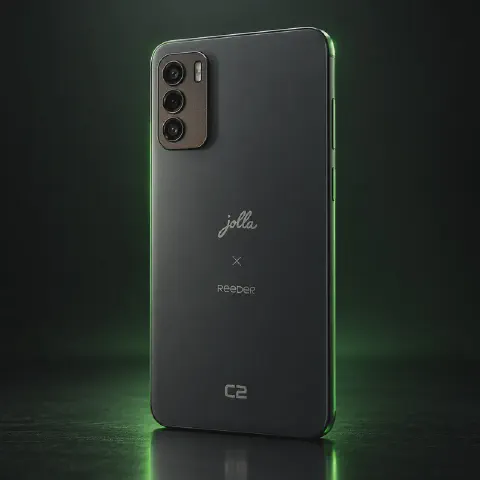
Sailfish OS · Android app support · EU, UK, NO, CH · 6–8 week backorder
Which phones support Sailfish OS?
Sailfish OS officially supports a short list of phones. Jolla's own hardware, the new Jolla Phone (shipping since July 2026) and the Jolla C2, arrives with Sailfish OS installed. On Sony, the Sailfish X program covers the Xperia 10 V, 10 IV, 10 III and 10 II, with older Xperia 10 and XA2 models still listed; each needs a specific stock Android version before flashing, and you buy the licence and image from the Jolla Shop. Community ports exist for other phones, but Jolla doesn't support them and no licence (so no AppSupport) is available for them.
| Brand | Model | Support note |
|---|---|---|
| Sony | Xperia 1 / 5 / 10 series | Sailfish X — Xperia 10 II–IV |
| Jolla | Jolla C2 | Ships preinstalled |
Not sure about your exact model? Look up your phone or open the official Sailfish OS device list.
How to install Sailfish OS
What you need: Nothing on a Jolla phone: it ships with Sailfish OS. Supported Sony Xperias need a Sailfish X licence, an unlocked bootloader and a computer.
- On a Jolla phone, turn it on and follow the setup screens; Sailfish OS is already installed.
- Sign in with a Jolla account only if you want the Jolla Store and system updates.
- Turn on Android AppSupport in Settings if you need Android apps, and get them from F-Droid or Aurora Store.
- Keep system updates on; they come from Jolla.
Sailfish OS vs the alternatives
Ubuntu Touch is fully open source and free, and runs on more phones, but Android apps need Waydroid and a terminal. Pick it if openness matters more to you than polish.
/e/OS is degoogled Android, so app compatibility is much better and banking apps often work through microG. It's the safer choice if you rely on many Android apps.
GrapheneOS on a Pixel gives stronger security and the best app compatibility through sandboxed Google Play. Choose it if you want privacy without leaving Android.
Every system side by side: the feature table and how the privacy scores work.
Who Sailfish OS is for
Sailfish OS suits people in Europe who want a phone outside the Google and Apple world, like a clean gesture interface, and can live with a smaller app selection. It's a strong fit for a Jolla Phone or Jolla C2 owner, or for someone with a supported Xperia 10 who wants to try it. If your bank's app, Google Wallet or a long list of Android apps are must-haves, a degoogled Android system will cause you fewer headaches.
Sailfish OS FAQ
What is the latest version of Sailfish OS?
Sailfish OS 5.1 (Pispala) is the current release for all supported devices, from June 2026. Sailfish OS 5.2 (Finlayson) shipped first on the new Jolla Phone in July 2026, and Jolla said other devices would get it once issues on older Xperias are fixed.
Which phones can run Sailfish OS?
Jolla's own phones, the 2026 Jolla Phone and the Jolla C2, ship with it. Through Sailfish X it also runs on the Sony Xperia 10 V, 10 IV, 10 III and 10 II, plus some older Xperia 10 and XA2 models. Other phones only have unofficial community ports.
Can Sailfish OS run Android apps?
Yes. Android AppSupport lets you install Android apps from Aurora Store, F-Droid or .apk files. It requires a Sailfish OS licence, Google Play itself isn't supported, and apps that depend on Google Play Services may only work partly.
Do banking apps work on Sailfish OS?
Some do and many don't. Apps that check Google's Play Integrity often refuse to run on AppSupport, and Google Wallet doesn't work. Search the Sailfish OS community forum for your bank before switching.
Is Sailfish OS free? The licence explained
The base system is free to download for supported Xperias, but the Sailfish OS licence, which adds Android AppSupport, Microsoft Exchange support and system updates, is paid. One licence covers one device and one Jolla account. The Jolla C2 includes the licence.
Is Sailfish OS open source?
Partly. The core of the system is open source, but the user interface layer and Android AppSupport are proprietary. If a fully open system matters to you, look at Ubuntu Touch, PureOS or Nura (postmarketOS).
Sources
- Sailfish OS documentation: Supported devices
- Sailfish OS documentation: Android AppSupport
- Sailfish OS documentation: Sailfish OS licence
- Sailfish Community News, August 27, 2026
- Release notes: Finlayson 5.2.0.15 (Jolla Phone only)
- Jolla Shop: Jolla Phone
- Wikipedia: Sailfish OS
Facts come from the Sailfish OS project and device makers, checked November 6, 2026. Spotted something out of date? Send us a correction.