Ubuntu Touch guide: supported devices, install and Android apps
A community-built Linux phone OS with no Google inside, for people who want something genuinely different from Android.
- Install effort
- Moderate · UBports installer
- Apps and Google
- Linux apps; Android via Waydroid
- Relock bootloader
- No
- Phones in our database
- 4 model groups
Ubuntu Touch is a mobile operating system built on Ubuntu Linux instead of Android. Canonical started it, then dropped it in 2017, and the volunteer UBports community has developed it ever since. There’s no Google account, no Play Services and no advertising ID anywhere in the system, because none of that code was ever part of it.
The current releases are based on Ubuntu 24.04 LTS. In July 2026 UBports shipped 24.04-2.0, its biggest feature update in years: Morph Browser jumped from Chromium 87 to Chromium 134, the shell learned to work around notches and rounded corners, and printing arrived. Maintenance releases 24.04-2.1 and 24.04-2.2 followed in October. Devices that can’t fit the larger 2.x system image stay on the 24.04-1.x series, which still gets fixes (24.04-1.6 at the time of writing).
Ubuntu Touch runs on a few dozen phones and tablets that were originally sold with Android, from Fairphones and Volla phones to older Xiaomi and OnePlus models. Volla even sells phones with it installed. It’s the most approachable true Linux phone system today, but it’s still a project for patient people: native apps are limited, Android apps need Waydroid, and banking apps rarely work.
Ubuntu Touch at a glance
| Based on | Ubuntu 24.04 LTS (not Android) |
|---|---|
| Made by | UBports, a volunteer community with a non-profit foundation |
| Current release | 24.04-2.2 (October 2026), with 24.04-1.6 for older ports |
| Interface | Lomiri, a gesture-driven touch shell |
| Android apps | Through Waydroid, set up from a terminal |
| Price | Free and open source |
| Website | ubports.com |
| App compatibility | Native Linux apps from the OpenStore; Android apps only through Waydroid, which isn't seamless |
| Updates | Over the air from the UBports community |
What Ubuntu Touch does for your privacy
No Google code at all
Ubuntu Touch isn’t a cleaned-up Android, so there are no Google services to remove or block in the first place.
Confined apps
Apps from the OpenStore run under AppArmor policies that limit what they can reach, and you approve camera, location and microphone access.
Over-the-air updates
Releases arrive in System Settings > Updates and roll out in stages, so UBports can stop a bad update before it reaches everyone.
Lomiri touch interface
Edge swipes open the launcher, the app switcher and the indicators. It feels unlike Android or iOS, and many users like it once they learn it.
Modern browser
Morph Browser moved to Chromium 134 in 24.04-2.0, which fixes many sites that broke on the old engine. There’s an optional Widevine installer for DRM video.
Convergence
On supported devices you can plug in a screen, keyboard and mouse and use the phone like a small desktop, including legacy Linux desktop apps.
Data encryption
User data encryption is no longer experimental on newer devices that support fscrypt v2.
What breaks, and what still works
Banking and payment apps
Apps that need Google’s Play Integrity or SafetyNet checks are unlikely to run in Waydroid, UBports says. Plan on using your bank’s website instead.
Android apps in general
Waydroid runs many Android apps, but you set it up with a terminal command, it costs extra battery, and it can clash with Ubuntu Touch over the camera.
Native app choice
The OpenStore has the basics (maps, messaging clients, podcasts, weather) plus web apps, but nothing like Android’s catalogue.
Calls on some networks
Voice over LTE depends on the device and is still being extended. Where carriers have switched off 3G, as in the US, check your phone’s VoLTE status before relying on it for calls.
Some hardware features
Each port has its own list of what works. Cameras, fingerprint readers and hardware video decoding can be missing or partial, so read the device page first.
Ubuntu Touch pros and cons
Phones to buy for Ubuntu Touch
Each of these runs Ubuntu Touch with official support or ships with it. Amazon prices change daily, so we show a price band; maker-shop phones show the maker's list price.
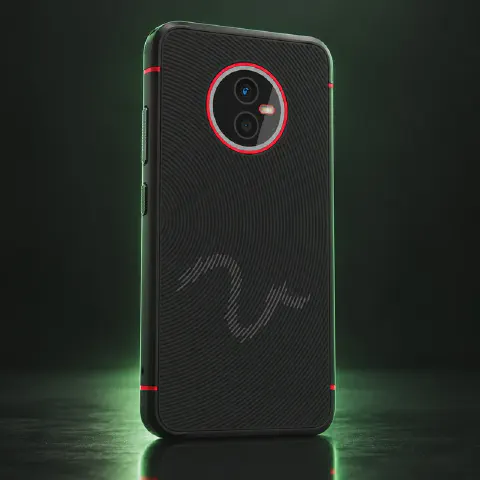
Volla OS / Ubuntu Touch · IP68 · big battery
Which phones support Ubuntu Touch?
Ubuntu Touch runs on phones that were sold with Android, using a compatibility layer (Halium) to reuse their drivers. That's why the device list mixes current hardware like the Fairphone 5 and Volla Phone Quintus with years-old Xiaomi, OnePlus and Google models. UBports' device site lists over 100 ports, but quality ranges from nearly complete to barely booting. The 24.04-2.0 release went to about 20 devices at launch, including the Fairphone 4 and 5, every current Volla phone, the F(x)tec Pro1X, the Xiaomi Poco X3 and Redmi Note 9, and the new Zinwa Q25; more may follow in later 2.x updates. Before buying a phone for Ubuntu Touch, open its page on devices.ubuntu-touch.io and check the feature list for calls, mobile data, camera and VoLTE.
| Brand | Model | Support note |
|---|---|---|
| Fairphone | Fairphone 5 | Ubuntu Touch 24.04 — needs Android 13 firmware first |
| Fairphone | Fairphone 4 | UBports supported |
| Nothing | Nothing Phone (1) / Phone (2) | Phone (1) — UBports |
| Volla | Volla Phone X23 / Quintus | Officially supported; Quintus multi-boot paused since its Aug 2026 kernel update, until the next Ubuntu Touch release |
Not sure about your exact model? Look up your phone or open the official Ubuntu Touch device list.
How to install Ubuntu Touch
What you need: A Windows, macOS or Linux computer with the UBports Installer, and a USB cable. Some ports need a specific stock Android version first; the device page says which.
- Open your model's page on devices.ubuntu-touch.io and check the support level and any firmware requirement.
- Install the UBports Installer on your computer.
- Unlock the bootloader if the device needs it, then connect the phone.
- Pick your device and the stable channel in the installer, and follow its prompts.
- After the first boot, get apps from the OpenStore.
Ubuntu Touch vs the alternatives
Nura (formerly postmarketOS) runs mainline Linux instead of Android drivers, so devices can stay supported for much longer. It's further from daily-driver polish, and better for tinkerers than for first-time switchers.
Sailfish OS is the more polished commercial alternative, with Jolla's AppSupport for Android apps built in. You pay for a licence (or buy a Jolla phone), and parts of the system are closed source.
If you need banking apps and a big app catalogue, /e/OS keeps Android's app compatibility through microG while still removing Google from the system. It's the easier everyday choice.
Every system side by side: the feature table and how the privacy scores work.
Who Ubuntu Touch is for
Ubuntu Touch suits Linux fans, privacy idealists and anyone with a supported spare phone who wants to see what a phone without Google or Android feels like. It's a good second phone, or a main phone if your needs are calls, messages, maps and the web. It isn't the right pick if you depend on a banking app, Google Wallet-style payments, or a long list of Android apps; a degoogled Android system like GrapheneOS or /e/OS covers that far better.
Ubuntu Touch FAQ
Which devices are supported by Ubuntu Touch?
UBports lists over 100 ports at devices.ubuntu-touch.io, but only some are in good shape. The current 24.04-2.x release launched on about 20 devices, including the Fairphone 4 and 5, Volla phones, the F(x)tec Pro1X, the Xiaomi Poco X3 and Redmi Note 9, and the OnePlus Nord N10 5G and N100. Check each device page for what works before you buy.
Is Ubuntu Touch still being developed?
Yes. UBports released Ubuntu Touch 24.04-2.0 in July 2026 and maintenance releases 24.04-2.1 and 24.04-2.2 in October 2026, alongside 24.04-1.x updates for older ports. The project also holds regular public Q&A sessions.
Can Ubuntu Touch run Android apps?
Yes, through Waydroid, a container that runs Android inside Ubuntu Touch. On Halium 9 and newer devices it comes preinstalled and you start it with one terminal command, waydroid init. Many apps work, but apps that need Google's Play Integrity checks, such as most banking apps, are unlikely to run.
Is Ubuntu Touch good for privacy?
It contains no Google services and no advertising ID, and apps are confined by AppArmor. Our privacy score is 8 out of 10. The main limits are an unlocked bootloader and the fact that Android apps you add through Waydroid can still include their own trackers.
How do I install Ubuntu Touch?
Download the UBports Installer for Windows, macOS or Linux, unlock your phone's bootloader if needed, connect it with a USB cable and pick your device and the stable channel. Some devices need a specific stock Android version first, which the device page lists.
Can I buy a phone with Ubuntu Touch preinstalled?
Yes. Volla sells its phones, such as the Volla Phone X23 and Quintus, with Ubuntu Touch as an option instead of Volla OS. That's the easiest way to try it without flashing anything.
Sources
- UBports: Ubuntu Touch 24.04-2.0 and 24.04-1.4 release
- UBports: Ubuntu Touch 24.04-2.2 and 24.04-1.6 release
- Ubuntu Touch device list
- UBports documentation: Android apps (Waydroid)
- UBports documentation: Install Ubuntu Touch
- Volla operating systems
Facts come from the Ubuntu Touch project and device makers, checked November 6, 2026. Spotted something out of date? Send us a correction.