Volla OS guide: phones, Security Mode, apps and what breaks
A Google-free Android from Germany that comes preinstalled on Volla's own phones and tablet, with a simpler home screen and a built-in Security Mode.
- Install effort
- None · preinstalled
- Apps and Google
- Android apps, no Google
- Relock bootloader
- n/a
- Phones in our database
- 1 model groups
Volla OS is the operating system that Volla, a small German company from Remscheid, puts on its own phones and tablet. It’s built on the Android Open Source Project without Google’s apps, Google Play services or a Google account, and Volla doesn’t ask you to create a Volla account either. Because it’s still Android underneath, most Android apps run on it.
What sets it apart is the way it looks and works. Instead of a grid of apps, you start on the Volla springboard: a home screen with a smart text field that guesses what you want to do as you type, such as call a contact, write a message, add a note or search the web. A red quick-menu button and collections of recent people, conversations, news and notes cover the rest. Under the hood there’s a Security Mode that can lock away apps and block trackers, phishing and malware domains, and Volla OS 16 moved the whole system to Android 16 in 2026.
This guide reviews what Volla OS does, which phones run it, what still breaks and how it compares with /e/OS, iodéOS and Ubuntu Touch. The facts come from Volla’s own pages and release notes; we haven’t used a Volla phone ourselves.
Volla OS at a glance
| Based on | Android Open Source Project (AOSP); Volla OS 16 runs on Android 16 |
|---|---|
| Made by | Volla Systeme GmbH, Remscheid, Germany |
| Current release | Volla OS 16 (update of 14 to 16 October 2026, with the October 2026 security patch) |
| Google services | None; optional microG for apps that expect Google |
| Runs on | Volla phones and the Volla Tablet only, preinstalled |
| Price | Free and open source, included with Volla hardware |
| Website | volla.online |
| App compatibility | Runs Android apps; no Google services, with apps from F-Droid or Aurora Store |
| Updates | Over the air from Volla |
What Volla OS does for your privacy
No Google, no Volla account
There are no Google apps, Google Play services or Google cloud, and Volla doesn’t require an account of its own, so a new phone starts without signing in anywhere.
Springboard and smart text field
The home screen is a text field that suggests calls, messages, notes, reminders and web searches as you type, so many everyday tasks don’t need an app at all.
Security Mode with a firewall
Security Mode can block apps you don’t trust, block internet addresses of trackers, phishing and malware, and cut specific apps off the internet. Volla pitches it for children’s phones and small businesses too.
microG on request
For apps that need Google Play services, you can switch on microG, the open-source replacement. It’s off until you turn it on.
Two app stores built in
Aurora Store installs apps from the Play Store catalogue without a Google account and shows each app’s trackers; F-Droid offers open-source apps.
Multi-boot with Ubuntu Touch
Volla’s multi-boot lets you install Volla OS and Ubuntu Touch on the same phone and pick one at startup, so you can try Linux without giving up Android apps.
Volla Cloud without a data center
Volla Cloud links your own devices instead of storing data on company servers. Its first apps are Volla Messages and, in public beta since August 2026, the Volla Recovery backup.
What breaks, and what still works
Apps that require Play Integrity
Banking, ID and payment apps that check Google’s Play Integrity can refuse to run, even with microG on. Plenty of other apps work, but check the ones you rely on before switching.
Google Wallet
Google Wallet doesn’t run on any system Google hasn’t certified. Contactless payment is a standard Android feature, so other wallet apps that support it, such as some European bank apps, can still work; check yours first.
Android Auto and Google-only features
Anything that lives inside Google’s own apps, such as Android Auto, Google Assistant or Google Photos backup, isn’t part of Volla OS. We found no official statement on Android Auto with microG, so plan without it.
Only Volla hardware
Volla OS isn’t offered as an install for Pixels, Samsungs or other brands. If you want it, you buy a Volla phone or tablet.
Multi-boot can lag behind updates
Volla’s own release notes warn that an update for the Volla Phone Quintus moved to a newer kernel that Ubuntu Touch didn’t support yet, pausing multi-boot until a later Ubuntu Touch update.
Volla OS pros and cons
Phones to buy for Volla OS
Each of these runs Volla OS with official support. Amazon prices change daily, so we show a price band; maker-shop phones show the maker's list price.
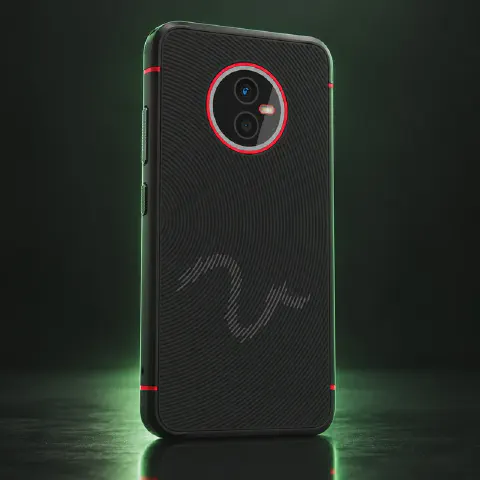
Volla OS / Ubuntu Touch · IP68 · big battery
Which phones support Volla OS?
Volla OS comes preinstalled on Volla's own devices. Volla OS 16, the current version, is available for the Volla Phone 22, Volla Phone X23, Volla Phone Quintus, Volla Phone Plinius and the Volla Tablet. The Plinius, launched in 2026, is the successor to the rugged X23 and has a Plinius Plus version with more storage. The first Volla Phone and the Volla Phone X stay on Volla OS 12. Volla doesn't publish builds for other brands, so the list below only contains Volla hardware.
| Brand | Model | Support note |
|---|---|---|
| Volla | Volla Phone X23 / Quintus | Ships preinstalled |
Not sure about your exact model? Look up your phone or open the official Volla OS device list.
How to install Volla OS
What you need: Nothing: Volla phones ship with Volla OS installed.
- Turn the phone on and work through setup; there's no Google account step.
- Install apps from F-Droid or Aurora Store.
- Keep over-the-air updates on; they come from Volla.
Volla OS vs the alternatives
Ubuntu Touch runs on the same Volla phones and can sit next to Volla OS through multi-boot. Choose it if you want a real Linux phone with a terminal and desktop-style apps, and accept that Android apps only run through Waydroid.
/e/OS is the closest Android alternative: also microG-based and sold preinstalled, but it runs on hundreds of phones from many brands and comes with Murena's cloud. Pick it if you want a regular Android look or a phone that isn't a Volla.
iodéOS is a good match if you like the built-in blocking idea: its tracker blocker is on by default for every app. It runs on Fairphones, Pixels and the BraX3 instead of Volla hardware.
Every system side by side: the feature table and how the privacy scores work.
Who Volla OS is for
Volla OS is for people who want a phone that arrives without Google and without setup, and who like the idea of a quieter, text-driven home screen that keeps them off apps. It also fits parents and small businesses that want Security Mode to lock down what a phone can reach. If you already own a phone you like, or you need the strongest security for a Pixel, look at GrapheneOS or /e/OS instead, because Volla OS only comes with Volla hardware.
Volla OS FAQ
Is Volla OS degoogled?
Yes. Volla OS is built on the Android Open Source Project without Google apps, Google Play services or Google's cloud, and it doesn't need a Google or Volla account. You can turn on microG if an app needs Google services.
Which phones run Volla OS?
Only Volla's own hardware. Volla OS 16 is available for the Volla Phone 22, X23, Quintus, Plinius and the Volla Tablet. The original Volla Phone and the Volla Phone X stay on Volla OS 12.
Can I install Volla OS on a Pixel or Samsung phone?
No. Volla doesn't publish Volla OS builds for other brands. If you want a Google-free system on a phone you already own, look at GrapheneOS for Pixels or /e/OS and LineageOS for other brands.
Do banking apps work on Volla OS?
Many Android apps work, and microG helps with apps that expect Google services. Apps that require Google's Play Integrity check can still refuse to run. Volla is part of a consortium building an open alternative called UnifiedAttestation, but banks would need to adopt it first.
What is Volla Security Mode?
Security Mode is Volla's built-in protection setting. It lets you block apps you don't trust, block internet addresses of trackers, phishing and malware sites, and stop specific apps from going online, which also makes it useful for children's phones.
Can a Volla phone run Ubuntu Touch too?
Yes. Volla sells its phones with Volla OS or Ubuntu Touch, and the multi-boot feature lets you install both and choose one at startup. Check the release notes for your model, because kernel updates have occasionally paused multi-boot until Ubuntu Touch caught up.
How long does Volla update its phones?
Volla says its devices get system updates for at least five years. In 2026 Volla OS 16 brought Android 16 and regular security patch updates to the Volla Phone 22, X23, Quintus, Plinius and Tablet.
Sources
- Volla OS overview (Volla)
- Volla home page: Security Mode, Volla Cloud, multi-boot, updates
- Volla OS release notes (Volla's GitHub wiki)
- Volla imprint: Volla Systeme GmbH, Remscheid
- heise: consortium works on UnifiedAttestation for Google-free phones
- Android Authority: what UnifiedAttestation means for custom ROMs
Facts come from the Volla OS project and device makers, checked November 6, 2026. Spotted something out of date? Send us a correction.