Motorola Signature 27
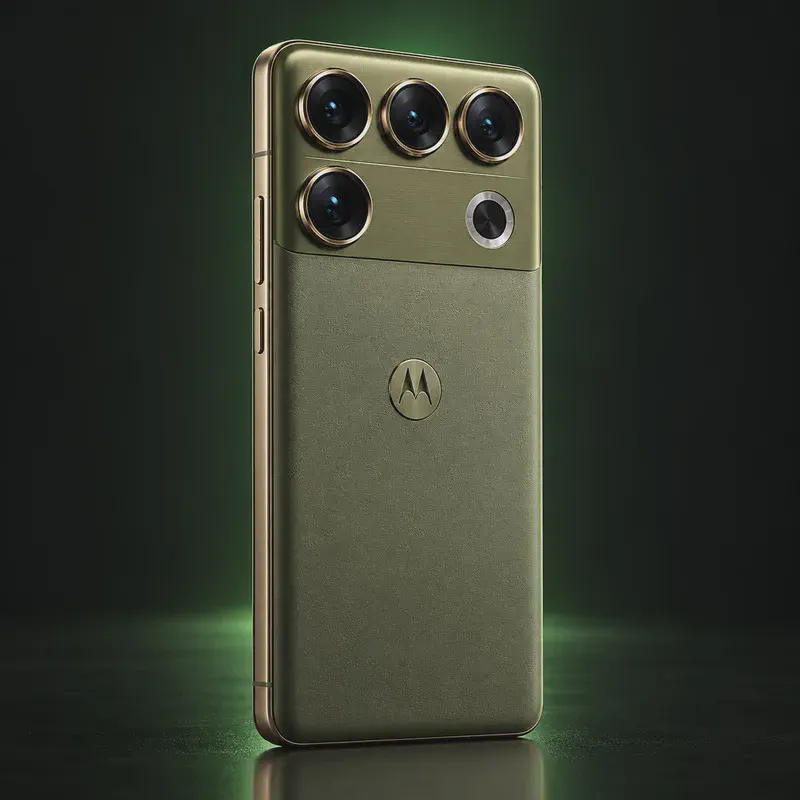
The Motorola Signature 27 is the phone that ends GrapheneOS’s Pixel-only era. Motorola and the GrapheneOS Foundation announced a partnership at MWC in March 2026, and on September 22 GrapheneOS confirmed the Signature 27 will be “the initial supported phone.” Motorola gave a first look the same day at Qualcomm’s Snapdragon Summit, with the new Snapdragon 8 Elite Extreme Gen 6 chip, a 50 MP main camera and a 200 MP periscope telephoto.
For privacy buyers, the important part is the security hardware. GrapheneOS only supports phones with hardware memory tagging, a proper secure element and long updates. It says Motorola’s 2026 phones came close but fell short, and that the Signature 27 has what it needs. Motorola promises 7 OS updates and 7 years of security updates.
The trade-off is timing, and the status of the software is the thing to watch. The phone launches in the US and Canada in November 2026, but GrapheneOS hasn’t released builds or a date. Price and most specs aren’t public yet. This page lists only what’s confirmed and will be updated at launch.
Motorola Signature 27 tech specs
| Released | First look September 22, 2026; on sale in the US and Canada from November 2026 (per Motorola) |
|---|---|
| Chip | Qualcomm Snapdragon 8 Elite Extreme Gen 6 |
| Main camera | 50 MP Sony LYTIA 910 sensor, 3.5° optical image stabilization plus Qualcomm image stabilization |
| Telephoto camera | 200 MP periscope telephoto |
| Zoom | Super Zoom Pro up to 100x (uses generative AI at the long end) |
| Audio | Audio by B&O, Motorola's first phone with Bang & Olufsen tuning |
| Cooling | ArcticMesh system with liquid metal, copper mesh and a 3D vapor chamber 40% larger than the previous generation |
| Build | Aerospace-grade aluminum frame, glass-ceramic; camera housing in ceramic and brushed aluminum |
| Colors | PANTONE Coal Smoke (woven texture), PANTONE Capulet Olive (brushed textile finish) |
| Software updates | 7 OS updates and up to 7 years of security updates from global launch |
| Security hardware | Dedicated secure element, hardware memory tagging (MTE) and hardware USB protection, per GrapheneOS |
| Headphone jack | No (per GrapheneOS) |
| Display, battery, charging | Not announced yet |
| RAM and storage | Not announced yet |
| Water and dust rating, weight, size | Not announced yet |
| Launch price | Not announced yet |
Strengths and drawbacks
Private operating systems for the Motorola Signature 27
One private system has confirmed support for this exact model, but builds haven't been released yet. The table compares them on the things that matter day to day; the install guides below walk through each one.
| System | Support | Privacy | Effort | Apps and Google |
|---|---|---|---|---|
| GrapheneOS | Confirmed, coming | 10/10 | Easy · web installer, ~20 min | Sandboxed Google Play, optional |
- GrapheneOS: GrapheneOS confirmed on September 22, 2026 that this will be its first supported Motorola phone and its first non-Pixel phone. No builds are out yet and no release date has been given, so don't count on support on launch day. The project says it intends to provide 7 years of updates with official firmware and driver code from Motorola.
Not available for this model
- CalyxOS: No announced plans and not on CalyxOS's device list as of October 2026.
- LineageOS: No official build; the phone isn't on sale yet.
- /e/OS: Not on the /e/OS device list and no announced plans.
- iodéOS: Not on iodé's device list and no announced plans.
Privacy scores and effort levels are explained in how we score each system; the feature-by-feature OS table goes deeper.
Unlocking the bootloader on the Motorola Signature 27
Motorola runs an official bootloader unlock program for most of its recent phones, but it hasn't published anything specific to the Signature 27 yet, and GrapheneOS hasn't published install instructions for it. Don't follow third-party unlock guides for this model; GrapheneOS has said claims circulating about how unlocking will work are wrong.
- Buy the unlocked retail model sold by Motorola or a general retailer, not a carrier-branded one.
- Wait until GrapheneOS lists the Signature 27 as supported on its releases page.
- Follow GrapheneOS's official install guide for this model; it will cover unlocking and relocking.
- Until then, use the phone on the stock OS and harden it with the steps in our no-flashing guide.
- Motorola's unlock program excludes carrier-exclusive models (its own examples are Verizon, AT&T and Tracfone).
- Price, full specs and the exact launch date haven't been announced; this page lists only what Motorola and GrapheneOS have confirmed.
- Preinstalled GrapheneOS phones are planned but GrapheneOS says probably not for the initial launch.
How to install a private OS on the Motorola Signature 27
Short versions of each project's official guide. Always keep the official page open while you work: it has the exact files for your model and changes faster than any summary.
Installing GrapheneOSEasy · web installer, ~20 min
What you need: A computer with a Chromium-based browser (Chrome, Edge or Brave), a good USB-C cable, about 20 minutes. Installing erases the phone, so back up first.
Apps: Sandboxed Google Play, optional: runs as an ordinary app with no special access. Bootloader: Yes, the installer relocks the bootloader.
- Update the stock Android first, then turn on OEM unlocking: Settings → About phone, tap Build number seven times, then Settings → System → Developer options → OEM unlocking (the phone needs internet once for this).
- Restart into the bootloader: turn the phone off, then hold Volume Down while pressing Power.
- Open the web installer on your computer, connect the phone, and click Unlock bootloader. Confirm on the phone with the volume keys and Power.
- Click Download release, then Flash release, and leave the cable alone until it finishes.
- Click Lock bootloader and confirm on the phone. Start it up, and turn OEM unlocking back off in Developer options.
- Optional: install sandboxed Google Play from GrapheneOS's own App Store if you need banking or other Play-only apps.
Who the Motorola Signature 27 is for
People who want GrapheneOS on flagship hardware and can wait for it. If you need a private phone now, a Pixel 10 or Pixel 9a runs GrapheneOS today; check back here once GrapheneOS lists the Signature 27 as supported.
Motorola Signature 27 questions, answered
Does the Motorola Signature 27 run GrapheneOS?
GrapheneOS has confirmed it will be its first supported Motorola phone, but as of October 14, 2026 no builds have been released. Support may not be ready on the day the phone goes on sale.
Will the Motorola Signature 27 be sold with GrapheneOS preinstalled?
GrapheneOS says devices sold with GrapheneOS installed are planned but the details still need to be worked out, and probably not for the initial launch. At first you'll install it yourself.
Should I buy a Signature 27 or a Pixel for GrapheneOS?
If you need a private phone now, buy a Pixel 10 or Pixel 9a, which run GrapheneOS today. If you want flagship hardware and can wait, wait until GrapheneOS lists the Signature 27 as supported before buying.
Sources
- Motorola press release, first look at the motorola signature 27 (September 22, 2026)
- Motorola US product page (coming this November)
- Motorola UK product page
- GrapheneOS on X, confirmation of the Signature 27 (September 22, 2026)
- GrapheneOS on X, preinstalled devices planned (September 23, 2026)
- GrapheneOS on Mastodon, the first device's security hardware (October 5, 2026)
- Motorola at MWC 2026, partnership with the GrapheneOS Foundation
- Motorola bootloader unlock program
Every fact on this page comes from the maker or the OS project's own pages, checked October 14, 2026. We don't claim hands-on testing. Found something out of date? Report a correction.