Nothing Phone (3)
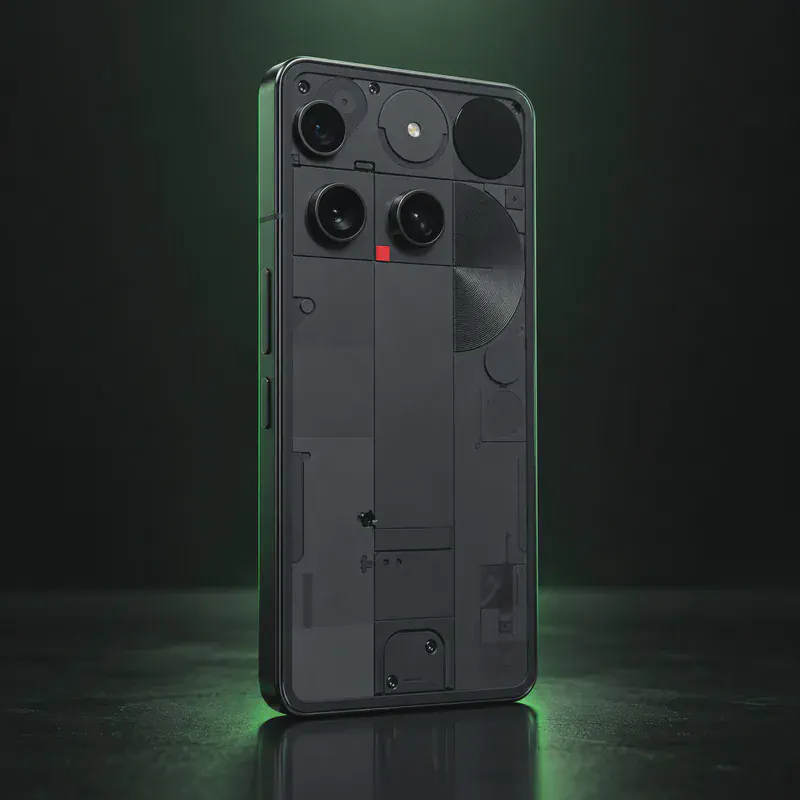
The Nothing Phone (3) is Nothing’s 2025 flagship, launched in July 2025 with a Snapdragon 8s Gen 4, a 6.67-inch 120 Hz AMOLED screen, four 50 MP cameras and IP68 protection. Nothing promises five years of Android updates and seven years of security updates, counted from when the phone first went on sale on nothing.tech.
It is on this site for one reason, and the answer is plain: as of October 14, 2026, no privacy OS officially supports the Phone (3) (codename metroid). It is not on the GrapheneOS, CalyxOS, LineageOS, /e/OS or iodéOS device lists. LineageOS supports the older Phone (1) and Phone (2), and postmarketOS has ports for other Nothing models. For the Phone (3), only an unofficial alpha LineageOS device tree exists on GitHub.
So the realistic path is hardening the stock OS: keep the bootloader locked, skip the Google account, disable Google apps, set Private DNS and get apps from F-Droid or Aurora Store. You get long security support, but Google services stay on the phone. If a fully Google-free phone is the goal, pick a model that a privacy OS lists officially.
Nothing Phone (3) tech specs
| Released | July 2025 |
|---|---|
| Display | 6.67-inch flexible AMOLED, 1260 × 2800, up to 120 Hz |
| Chip | Qualcomm Snapdragon 8s Gen 4 |
| RAM / Storage | 12 GB + 256 GB or 16 GB + 512 GB |
| Rear cameras | 50 MP main + 50 MP 3x telephoto + 50 MP ultrawide (114°) |
| Front camera | 50 MP |
| Battery | 5,150 mAh (5,500 mAh in India) |
| Charging | 65 W wired, 15 W wireless, 5 W reverse wireless |
| Water/dust rating | IP68 |
| Weight | 218 g |
| Size | 160.60 × 75.59 × 8.99 mm |
| SIM | Dual nano-SIM |
| Connectivity | Wi-Fi 7, Bluetooth 6.0, NFC |
| Current OS | Nothing OS 4 (Android 16) |
| Bootloader unlock | Yes, fastboot flashing unlock (no official private OS to install) |
| Launch price | $799 (12 GB/256 GB, US) |
| Codename | metroid (used on OS download pages) |
Strengths and drawbacks
Private operating systems for the Nothing Phone (3)
Not available for this model
- GrapheneOS: GrapheneOS only supports Google Pixel phones.
- CalyxOS: Not on CalyxOS's device list as of Oct 2026.
- LineageOS: No official LineageOS build. The wiki lists Nothing Phone (1) and Phone (2) only. An unofficial alpha LineageOS 23 device tree for metroid exists on GitHub; it is not supported.
- /e/OS: Not on /e/OS's device list; the only Nothing-brand device listed is the CMF Phone 1.
- iodéOS: No Nothing devices on iodé's official list as of Oct 2026.
- Nura (postmarketOS): postmarketOS lists ports for Nothing Phone (1), (2), (2a), (3a) and (4a), but not the Phone (3).
- Ubuntu Touch: Ubuntu Touch lists only the Nothing Phone (1).
Privacy scores and effort levels are explained in how we score each system; the feature-by-feature OS table goes deeper.
Unlocking the bootloader on the Nothing Phone (3)
The bootloader can be unlocked with fastboot, but no official private OS exists for this model, so unlocking brings no privacy gain. Keep it locked and harden the stock OS.
- Keep the bootloader locked unless you have a specific reason to unlock; a locked bootloader keeps verified boot active.
- If you do unlock: enable Developer options, then OEM unlocking and USB debugging.
- Run 'adb reboot bootloader', then 'fastboot flashing unlock'.
- Confirm on the phone with the volume and power keys; the phone wipes itself.
- No official degoogled OS exists for the Phone (3) as of Oct 14, 2026; unofficial builds and GSIs are untested by any OS project.
- Unlocking erases all data.
- We found no Nothing statement on whether unlocking affects the Phone (3) warranty; check before unlocking.
How to harden the Nothing Phone (3) without a new OS
- Skip or remove the Google account — sign in only where truly unavoidable
- Disable or uninstall Google apps: Assistant, ad services, usage telemetry
- Set Private DNS to a tracker-blocking resolver (Settings → Network)
- Install private defaults (F-Droid, Aurora Store or the developer's site): Signal, Proton Mail, Organic Maps, a hardened browser
- Add an always-on VPN and turn off ad personalization + data sharing
Who the Nothing Phone (3) is for
A buyer who wants a well-built phone with long stock updates and is willing to harden Android rather than replace it. Not for someone who wants a phone fully free of Google.
Nothing Phone (3) questions, answered
Is there a degoogled OS for the Nothing Phone (3)?
Not officially, as of October 2026. It is not on the GrapheneOS, CalyxOS, LineageOS, /e/OS or iodéOS lists; only an unofficial alpha LineageOS device tree exists.
Can I unlock the Nothing Phone (3) bootloader?
Yes, with 'fastboot flashing unlock' after enabling OEM unlocking. Without an official OS to install, though, unlocking only weakens security, so keeping it locked is the better choice for privacy.
How do I make the Nothing Phone (3) more private without a new OS?
Skip or remove the Google account, disable Google apps you don't use, set Private DNS, and install apps from F-Droid or Aurora Store. Keep the bootloader locked so verified boot stays active.
Sources
- Nothing US — Phone (3) product page and specs
- Nothing Support — Phone (3) dimensions and weight
- LineageOS Wiki — device list
- /e/OS docs — device list
- iodéOS official supported devices
- GrapheneOS FAQ — supported devices
- CalyxOS — install / device list
- postmarketOS wiki — devices
- Ubuntu Touch — devices
- GitHub — unofficial android_device_nothing_metroid (not supported)
- TechCrunch — Phone (3) US availability (secondary)
Every fact on this page comes from the maker or the OS project's own pages, checked October 14, 2026. We don't claim hands-on testing. Found something out of date? Report a correction.