POCO F5 Pro
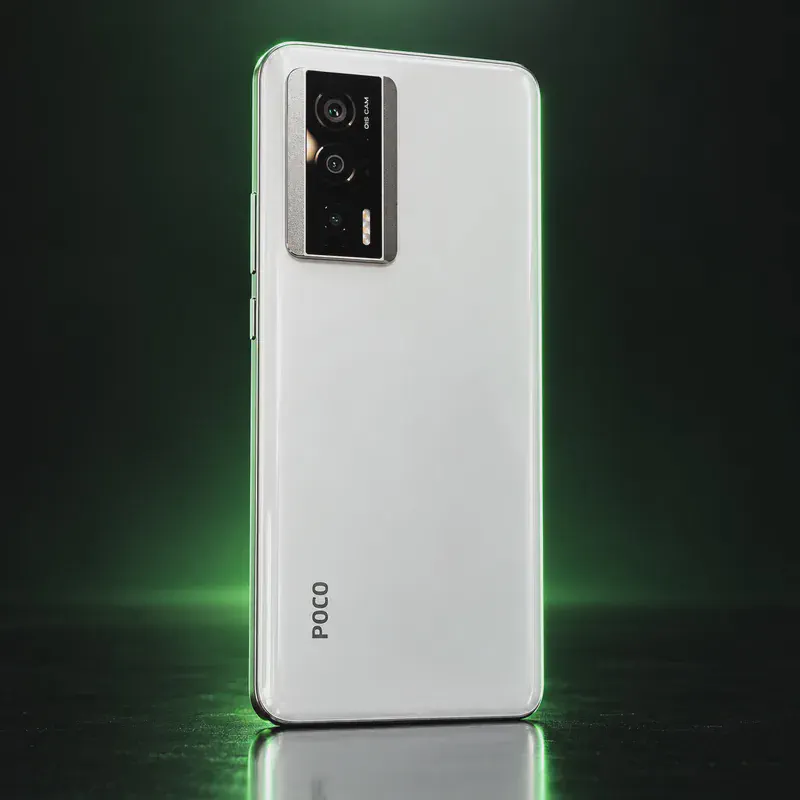
The POCO F5 Pro is Xiaomi’s May 2023 global phone with a Snapdragon 8+ Gen 1, a 6.67-inch 3200 × 1440 AMOLED screen, a 5,160 mAh battery, 67 W wired and 30 W wireless charging. It is a 2022 flagship chip in a phone that cost midrange money at launch.
For privacy, the global model (23013PC75G, codename mondrian) is an official LineageOS device with LineageOS 24.0 (Android 17) nightlies, and e Foundation publishes /e/OS community builds for it. Once unlocked, it runs a current LineageOS release.
Getting there is the hard part. Xiaomi requires a Mi account, its Windows-only Mi Unlock tool and a waiting period. LineageOS’s guide notes that an account can unlock only one HyperOS device per year, and reports from late 2025 say Xiaomi pulled its Community-app unlock application. US buyers face a second problem: this is an import, and Xiaomi’s band list lacks LTE bands 12, 13 and 71, so coverage on US carriers will be weaker. Trade press also reports that stock updates ended around May 2026, which makes a maintained private OS more useful here.
POCO F5 Pro tech specs
| Released | May 2023 |
|---|---|
| Display | 6.67-inch AMOLED, 3200 × 1440, up to 120 Hz |
| Chip | Qualcomm Snapdragon 8+ Gen 1 |
| RAM / Storage | 8+256 GB, 12+256 GB or 12+512 GB (LPDDR5, UFS 3.1) |
| Rear cameras | 64 MP main + 8 MP ultrawide + 2 MP macro |
| Front camera | 16 MP |
| Battery | 5,160 mAh |
| Charging | 67 W wired, 30 W wireless |
| Water/dust rating | IP53 (splash resistant) |
| Weight | 204 g |
| Size | 162.78 × 75.44 × 8.59 mm |
| SIM | Dual nano-SIM |
| LTE bands | FDD 1/2/3/4/5/7/8/18/19/20/28/66; no band 12, 13 or 71 |
| Extras | NFC, IR blaster, stereo speakers |
| OS at launch | MIUI 14 for POCO |
| Bootloader unlock | Yes, via Xiaomi's Mi Unlock tool (Windows) after an account wait |
| Codename | mondrian (used on OS download pages) |
Strengths and drawbacks
Private operating systems for the POCO F5 Pro
One private system officially supports this exact model (codename mondrian), plus one community build or port that works with less polish and slower fixes. The table compares them on the things that matter day to day; the install guides below walk through each one.
| System | Support | Privacy | Effort | Apps and Google |
|---|---|---|---|---|
| LineageOSLineageOS 24.0 (Android 17) | Official | 7/10 | Advanced · fastboot and recovery | No Google unless you add it |
| /e/OS/e/OS 4.3 community (Android 15) | Community build | 7.5/10 | Easy · installer app, or preinstalled | microG built in + App Lounge |
- LineageOS: Official nightlies (latest Oct 12, 2026) for model 23013PC75G, shared with the Redmi K60; the phone must be on stock Android 15 firmware first.
- /e/OS: Listed as a 'community' release for 23013PC75G (Sept 20, 2026 build, September 2026 patch); bootloader not relockable.
Not available for this model
- GrapheneOS: GrapheneOS only supports Google Pixel phones.
- CalyxOS: Not on CalyxOS's device list as of Oct 2026.
- iodéOS: Not on iodé's official list; its Xiaomi models are older Mi 9 / Mi 10 phones.
- Nura (postmarketOS): postmarketOS lists mondrian only as a non-booting port.
Privacy scores and effort levels are explained in how we score each system; the feature-by-feature OS table goes deeper.
Unlocking the bootloader on the POCO F5 Pro
Possible but slow and uncertain. Xiaomi requires a Mi account, its Windows-only Mi Unlock tool and a waiting period, and its HyperOS-era rules limit how many devices an account can unlock.
- Create a Mi account, add a phone number and put a SIM in the phone.
- Tap the OS version in About phone to enable Developer options, then link the phone under Developer options > Mi Unlock status.
- On a Windows PC, run Mi Unlock, boot the phone to fastboot (Volume Down + Power) and sign in.
- If the tool shows a waiting period, wait the full time, then run it again to unlock.
- The phone wipes; re-enable USB debugging before flashing.
- LineageOS's guide says one Mi account can unlock only one HyperOS device a year (plus three MIUI devices), at most once every 30 days, and the wait can be up to 30 days.
- Reports from late December 2025 say Xiaomi pulled the Community-app unlock application; check the current unlock status before buying, because without unlock permission no custom OS can be installed.
- Xiaomi limits daily unlocks; LineageOS suggests trying at midnight Beijing time (GMT+8).
- LineageOS needs stock Android 15 firmware first, and Mi Unlock runs only on Windows.
How to install a private OS on the POCO F5 Pro
Short versions of each project's official guide. Always keep the official page open while you work: it has the exact files for your model and changes faster than any summary.
Installing LineageOSAdvanced · fastboot and recovery
What you need: A computer with Android platform-tools (adb and fastboot) installed, a USB cable, and an evening. Follow the install page for your exact codename. Installing erases the phone.
Apps: No Google services by default; you add microG or Google apps yourself if you want them. Bootloader: Usually no: the bootloader stays unlocked on most devices.
- Find your phone's page on the LineageOS wiki by its codename and read the whole install guide once before you start.
- Make sure the stock firmware is the version the guide asks for, then unlock the bootloader the brand's official way.
- Flash the partitions the guide lists (such as boot, dtbo or vendor_boot) and boot into Lineage Recovery.
- In recovery, choose Factory reset → Format data, then Apply update → Apply from ADB, and run adb sideload with the LineageOS zip.
- Reboot. Add F-Droid for apps; skip the optional Google apps package if you want to stay degoogled.
Installing /e/OSEasy · installer app, or preinstalled
What you need: For a phone you already own: a Windows, macOS or Linux computer and a USB cable. The Easy Installer covers many models; others use a command-line guide on the device's page. Installing erases the phone.
Apps: microG built in, plus the App Lounge store that shows each app's trackers. Bootloader: stays unlocked with this build.
- Look up your exact model on the /e/OS device list and check whether it supports the Easy Installer.
- Download the Easy Installer (or the build and guide from the device page) on your computer.
- Turn on Developer options, USB debugging and OEM unlocking on the phone, and connect it.
- Follow the installer's screens: it unlocks, flashes /e/OS and, where possible, relocks the bootloader.
- Set up the phone. A Murena account is optional; you can skip it.
Who the POCO F5 Pro is for
A buyer outside the US, or a US buyer on T-Mobile in a city, who wants an official LineageOS phone with a fast chip and can wait out Xiaomi's unlock process. Not for anyone who needs a guaranteed unlock or rural US coverage.
POCO F5 Pro questions, answered
Is LineageOS official on the POCO F5 Pro?
Yes. The POCO F5 Pro (mondrian, model 23013PC75G) has official LineageOS 24.0 nightlies as of October 2026. /e/OS also has community builds.
How long does it take to unlock a POCO F5 Pro?
Xiaomi's Mi Unlock tool can impose a wait of up to 30 days, and HyperOS rules limit each account to one HyperOS device a year. Check Xiaomi's current unlock rules before buying, since they changed in 2024 and 2025.
Will the POCO F5 Pro work on US carriers?
Partly. Xiaomi's band list for the global model lacks LTE bands 12, 13 and 71, which US carriers rely on for wide coverage. Expect weaker signal outside cities.
Sources
- Xiaomi Global — POCO F5 Pro specs
- LineageOS Wiki — mondrian (POCO F5 Pro variant)
- LineageOS Wiki — mondrian install guide (Mi Unlock rules)
- /e/OS docs — POCO F5 Pro mondrian
- iodéOS official supported devices
- GrapheneOS FAQ — supported devices
- postmarketOS wiki — devices
- HyperOS Insider — unlock application removed (secondary, unconfirmed by Xiaomi)
- Gizmochina — Xiaomi/POCO end-of-support list (secondary)
Every fact on this page comes from the maker or the OS project's own pages, checked October 14, 2026. We don't claim hands-on testing. Found something out of date? Report a correction.