Sony Xperia 1 V
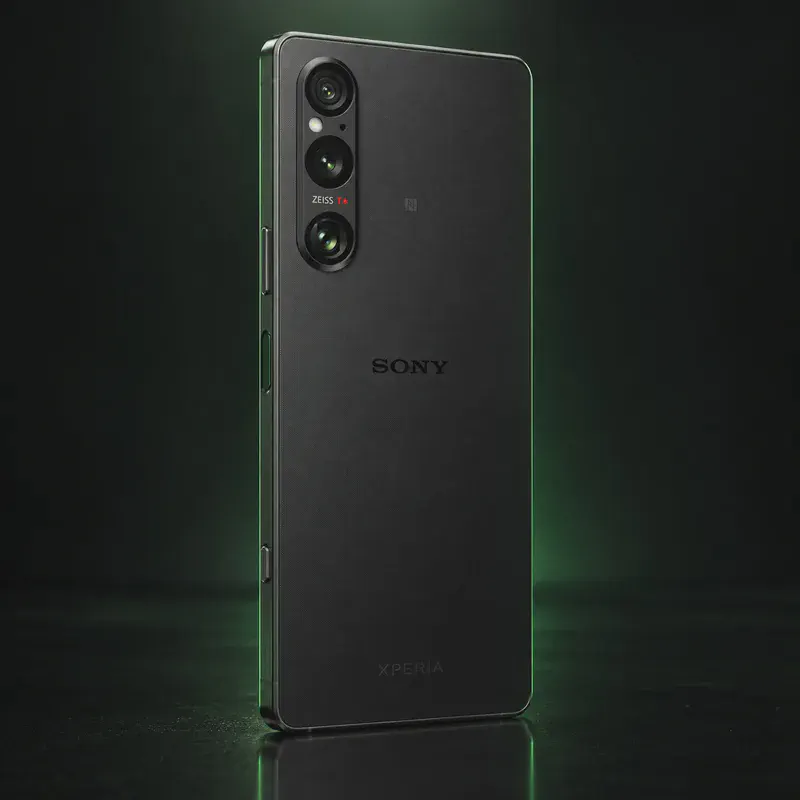
The Sony Xperia 1 V is Sony’s 2023 flagship, with a Snapdragon 8 Gen 2, a 6.5-inch 4K 21:9 OLED screen, a 48 MP stacked main sensor, a variable 85–125 mm telephoto, a 3.5 mm headphone jack and a microSD slot. It launched in the US at $1,399.99.
For privacy, Sony is one of the friendlier brands. Its developer site gives free bootloader unlock codes, and Sony added the Xperia 1 V to its Open Devices program. The phone (codename pdx234) is an official LineageOS device on 24.0 (Android 17), and iodéOS and /e/OS also list it.
The catch matters for Amazon US buyers. LineageOS and iodéOS support only the XQ-DQ54 and XQ-DQ72 models, and Sony’s unlock page states that the US variant cannot be unlocked. Check the model number before you buy. Unlocking also erases Sony’s DRM keys, which Sony warns can affect camera processing, and the stock OS already had its last major Android update. Ask the seller for the model number if the listing does not show it. Sony has not published a security-update end date, so a maintained private OS is the way to keep this phone patched.
Sony Xperia 1 V tech specs
| Released | July 2023 (US); announced May 2023 |
|---|---|
| Display | 6.5-inch 21:9 4K HDR OLED, 3840 × 1644, up to 120 Hz |
| Chip | Qualcomm Snapdragon 8 Gen 2 |
| RAM | 12 GB |
| Storage / microSD | 256 GB (512 GB in some regions) + microSDXC up to 1 TB |
| Rear cameras | 48 MP main (52 MP 1/1.35-inch sensor) + 12 MP 85–125 mm telephoto + 12 MP ultrawide |
| Front camera | 12 MP |
| Battery | 5,000 mAh |
| Charging | USB Power Delivery wired, Qi wireless |
| Water/dust rating | IPX5/IPX8 water, IP6X dust |
| Weight | 187 g |
| Size | 165 × 71 × 8.3 mm |
| Headphone jack | Yes, 3.5 mm |
| SIM | Dual nano-SIM |
| OS | Launched on Android 13; Android 15 was its last major update |
| Bootloader unlock | Yes on XQ-DQ54/XQ-DQ72 with a Sony code; NOT on the US model XQ-DQ62 |
| Launch price | $1,399.99 (US) |
| Codename | pdx234 (used on OS download pages) |
Strengths and drawbacks
Private operating systems for the Sony Xperia 1 V
2 private systems officially support this exact model (codename pdx234), plus one community build or port that works with less polish and slower fixes. The table compares them on the things that matter day to day; the install guides below walk through each one.
| System | Support | Privacy | Effort | Apps and Google |
|---|---|---|---|---|
| LineageOSLineageOS 24.0 (Android 17) | Official | 7/10 | Advanced · fastboot and recovery | No Google unless you add it |
| iodéOSiodéOS 7 (LineageOS 23, Android 16) | Official | 7.5/10 | Easy · official installer app | microG + built-in tracker blocker |
| /e/OS/e/OS 4.3 community (Android 14) | Community build | 7.5/10 | Easy · installer app, or preinstalled | microG built in + App Lounge |
- LineageOS: Official nightlies (latest Oct 12, 2026) for XQ-DQ54 and XQ-DQ72 only; the US model XQ-DQ62 is not listed and Sony says it cannot be unlocked.
- iodéOS: On iodé's official list for XQ-DQ54 and XQ-DQ72 with installer, VoLTE/VoWiFi and 5G support; firmware is not included, so update stock first.
- /e/OS: Listed as a 'community' release for XQ-DQ54 and XQ-DQ72; the latest build (Sept 21, 2026) is still Android 14 based.
Not available for this model
- GrapheneOS: GrapheneOS only supports Google Pixel phones.
- CalyxOS: Not on CalyxOS's device list as of Oct 2026.
- Nura (postmarketOS): postmarketOS lists the Xperia 1 VI, not the Xperia 1 V.
Privacy scores and effort levels are explained in how we score each system; the feature-by-feature OS table goes deeper.
Unlocking the bootloader on the Sony Xperia 1 V
Yes for the European XQ-DQ54 and Asian XQ-DQ72 models, using a free unlock code from Sony's developer site. Sony says the US model (XQ-DQ62) does not support bootloader unlock.
- Check Settings > About phone: the model must be XQ-DQ54 or XQ-DQ72.
- Dial *#*#7378423#*#*, open Service info > Configuration, and confirm 'Bootloader unlock allowed: Yes'.
- Enable Developer options, then OEM unlocking and USB debugging; note IMEI 1.
- Enter IMEI 1 on Sony's unlock page to get your unlock code.
- Power off, hold Volume Up while plugging in USB (blue light), then run 'fastboot oem unlock <code>'.
- Sony's unlock page says the Xperia 1 V US variant cannot be unlocked; many Amazon US listings are that model, so confirm XQ-DQ54/XQ-DQ72 before buying.
- Sony warns unlocking removes DRM security keys, which can affect some camera processing (e.g. noise reduction and low-light performance).
- Sony says unlocking may void the warranty and its repair network may need to replace parts.
- LineageOS needs stock Android 14 or 15 firmware installed first; iodéOS does not bundle firmware either.
How to install a private OS on the Sony Xperia 1 V
Short versions of each project's official guide. Always keep the official page open while you work: it has the exact files for your model and changes faster than any summary.
Installing LineageOSAdvanced · fastboot and recovery
What you need: A computer with Android platform-tools (adb and fastboot) installed, a USB cable, and an evening. Follow the install page for your exact codename. Installing erases the phone.
Apps: No Google services by default; you add microG or Google apps yourself if you want them. Bootloader: Usually no: the bootloader stays unlocked on most devices.
- Find your phone's page on the LineageOS wiki by its codename and read the whole install guide once before you start.
- Make sure the stock firmware is the version the guide asks for, then unlock the bootloader the brand's official way.
- Flash the partitions the guide lists (such as boot, dtbo or vendor_boot) and boot into Lineage Recovery.
- In recovery, choose Factory reset → Format data, then Apply update → Apply from ADB, and run adb sideload with the LineageOS zip.
- Reboot. Add F-Droid for apps; skip the optional Google apps package if you want to stay degoogled.
Installing iodéOSEasy · official installer app
What you need: A Windows, macOS or Linux computer, a USB cable and the iodé installer app. Installing erases the phone.
Apps: microG, plus a built-in tracker and ad blocker you can tune per app. Bootloader: On some devices; check iodé's device list.
- Check that your exact model is on iodé's supported device list.
- Download the iodé installer for your computer.
- Turn on Developer options, USB debugging and OEM unlocking on the phone, then connect it.
- Follow the installer step by step; it downloads the right build and flashes it.
- Set up the phone and look at the blocker settings in the iodé app.
Installing /e/OSEasy · installer app, or preinstalled
What you need: For a phone you already own: a Windows, macOS or Linux computer and a USB cable. The Easy Installer covers many models; others use a command-line guide on the device's page. Installing erases the phone.
Apps: microG built in, plus the App Lounge store that shows each app's trackers. Bootloader: stays unlocked with this build.
- Look up your exact model on the /e/OS device list and check whether it supports the Easy Installer.
- Download the Easy Installer (or the build and guide from the device page) on your computer.
- Turn on Developer options, USB debugging and OEM unlocking on the phone, and connect it.
- Follow the installer's screens: it unlocks, flashes /e/OS and, where possible, relocks the bootloader.
- Set up the phone. A Murena account is optional; you can skip it.
Who the Sony Xperia 1 V is for
A buyer who wants a headphone jack, microSD and a strong camera, and who will make sure the box says XQ-DQ54 or XQ-DQ72. It suits people happy to run LineageOS or iodéOS on 2023 hardware.
Sony Xperia 1 V questions, answered
Is the Xperia 1 V officially supported by LineageOS?
Yes, for models XQ-DQ54 and XQ-DQ72, with LineageOS 24.0 (Android 17) nightlies as of October 2026. The US model XQ-DQ62 is not on the list.
Can I unlock a US Xperia 1 V?
No. Sony's bootloader unlock page says the Xperia 1 V US variant does not support unlocking. Buy the XQ-DQ54 (Europe) or XQ-DQ72 (Asia) model if you want a private OS.
Will unlocking hurt the camera?
Sony warns that unlocking removes DRM security keys, which can affect advanced camera features such as noise reduction and low-light performance. The cameras still work, but results may differ from stock.
Sources
- Sony partner store — Xperia 1 V (XQ-DQ72) specifications
- Sony Developer — unlock bootloader (US variant note, DRM warning)
- Sony Open Devices — Xperia 1 V and 5 V added
- LineageOS Wiki — pdx234
- LineageOS Wiki — pdx234 install guide
- iodéOS official supported devices
- /e/OS docs — Xperia 1 V pdx234
- GrapheneOS FAQ — supported devices
- GSMArena — Android 15 is the last major update (secondary)
- Notebookcheck — US launch price (secondary)
Every fact on this page comes from the maker or the OS project's own pages, checked October 14, 2026. We don't claim hands-on testing. Found something out of date? Report a correction.