Volla Phone X23
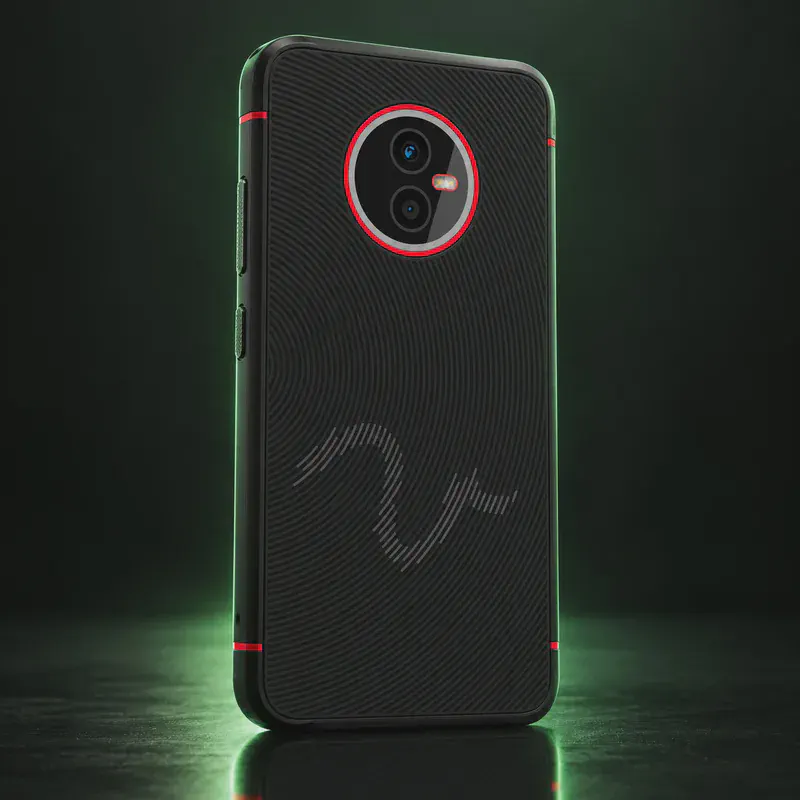
The Volla Phone X23 is a rugged phone from Volla Systeme, a German company that only sells Google-free phones. It is built to IP68 and MIL-STD-810H, carries a 5,000 mAh battery you can change without tools, and keeps a headphone jack, NFC, eSIM and a microSD slot. Inside is a MediaTek Helio G99 with 6 GB of RAM and 128 GB of storage.
Its standout feature is the choice of system. Volla OS is Volla’s own Android build without Google. It runs most Android apps, has optional microG, and moved to Android 16 in July 2026. Ubuntu Touch is a Linux system with its own app store, and Volla will ship the X23 with it preinstalled. With Volla OS as the main system, the built-in Boot Manager can add Ubuntu Touch as a second system, so you pick one at each start.
The trade-offs are size and screen. At 270 g and 12.2 mm it is heavy, the screen is 720p and there is no 5G. Volla also gives no end date for updates. The Ubuntu Touch port is listed as ‘Advanced support’ but is still on the older 20.04 base.
Volla Phone X23 tech specs
| Released | May 2023 |
|---|---|
| Display | 6.1-inch IPS, 720 × 1560 (HD+), 500–550 nits |
| Chip | MediaTek Helio G99 |
| RAM | 6 GB |
| Storage | 128 GB |
| microSD | Yes, up to 1 TB |
| Rear cameras | 48 MP wide (f/1.79, PDAF) + 8 MP ultra-wide (f/2.2) |
| Front camera | 16 MP (f/2.0) |
| Battery | 5,000 mAh, replaceable without tools |
| Charging | USB-C; wireless charging supported |
| Water/dust rating | IP68, plus MIL-STD-810H shock rating |
| Weight | 270 g |
| Size | 160.9 × 80 × 12.2 mm |
| Headphone jack | Yes, 3.5 mm |
| SIM/eSIM | 2 nano-SIM, or 1 nano-SIM + 1 eSIM |
| Connectivity | 4G LTE (no 5G), Wi-Fi 802.11ac, Bluetooth 5.2, NFC, FM radio |
| Price | €564 (Volla Shop, Oct 2026) |
| Codename | vidofnir (used on OS download pages) |
Strengths and drawbacks
Private operating systems for the Volla Phone X23
2 private systems officially support this exact model (codename vidofnir). The table compares them on the things that matter day to day; the install guides below walk through each one.
| System | Support | Privacy | Effort | Apps and Google |
|---|---|---|---|---|
| Volla OSVolla OS 16 (Android 16), August 2026 security patch | Preinstalled | Not rated | None · arrives installed | Android apps, no Google |
| Ubuntu TouchUbuntu Touch 20.04 OTA-12 (stable channel) | Preinstalled | 8/10 | None · arrives installed | Linux apps; Android via Waydroid |
- Volla OS: Volla's own Google-free Android build; it runs most Android apps, has optional microG, and includes the Volla Boot Manager for multi-boot.
- Ubuntu Touch: Volla sells the X23 with Ubuntu Touch preinstalled as an option and the port is rated 'Advanced support'. It is still on the older 20.04 base; UBports lists it as not yet supported by the current 24.04 release.
Not available for this model
- Sailfish OS: Not on Jolla's supported device list. A community Sailfish port exists (by piggz on the Sailfish forum), but it is unofficial.
- Nura (postmarketOS): Nura (formerly postmarketOS) marks the X23 as 'not booting'; a port has not been attempted.
- LineageOS: No official LineageOS build for vidofnir.
- /e/OS: Not on the /e/OS device list as of Oct 2026.
Privacy scores and effort levels are explained in how we score each system; the feature-by-feature OS table goes deeper.
Do you need to flash anything?
You can try Ubuntu Touch without unlocking anything: Volla OS's built-in Boot Manager installs it as a second system. A full reflash with the UBports Installer needs the bootloader unlocked with standard fastboot commands.
- Back up your data first.
- For multi-boot: open Settings > System > Volla Boot Manager, tap Install, reserve about 30 GB, pick Ubuntu Touch and install.
- Reboot, then use the volume keys to choose the system and press Power to start it.
- For a full reflash: unlock the bootloader first (UBports' install page requires this), using Android's standard fastboot unlock.
- Run the UBports Installer on your computer, select the Volla Phone X23 and follow the prompts.
- Multi-boot works only with Volla OS as the main system.
- Update a multi-boot Ubuntu Touch only from the Volla Boot Manager, never from inside Ubuntu Touch.
- A new Volla OS version can temporarily break multi-boot. Check Volla's release notes before updating.
- Unlocking or relocking the bootloader wipes the phone.
How to install a private OS on the Volla Phone X23
Short versions of each project's official guide. Always keep the official page open while you work: it has the exact files for your model and changes faster than any summary.
Setting up Volla OSPreinstalled
What you need: Nothing: Volla phones ship with Volla OS installed.
Apps: Runs Android apps; no Google services, with apps from F-Droid or Aurora Store.
- Turn the phone on and work through setup; there's no Google account step.
- Install apps from F-Droid or Aurora Store.
- Keep over-the-air updates on; they come from Volla.
Setting up Ubuntu TouchPreinstalled
What you need: A Windows, macOS or Linux computer with the UBports Installer, and a USB cable. Some ports need a specific stock Android version first; the device page says which.
Apps: Native Linux apps from the OpenStore; Android apps only through Waydroid, which isn't seamless.
- Open your model's page on devices.ubuntu-touch.io and check the support level and any firmware requirement.
- Install the UBports Installer on your computer.
- Unlock the bootloader if the device needs it, then connect the phone.
- Pick your device and the stable channel in the installer, and follow its prompts.
- After the first boot, get apps from the OpenStore.
Who the Volla Phone X23 is for
Outdoor and work users in Europe who want a tough, Google-free phone with a swappable battery. It is also a good pick for anyone who wants to try Ubuntu Touch while keeping an Android-app system on the same phone.
Volla Phone X23 questions, answered
Can the Volla Phone X23 run Android apps?
With Volla OS, yes. Volla says most Android apps work, and turning on microG fixes many apps that need Google Play Services. Ubuntu Touch is not Android-compatible and uses its own app store.
Can I run Volla OS and Ubuntu Touch on the same X23?
Yes. With Volla OS as the main system, the Volla Boot Manager in Settings > System installs Ubuntu Touch as a second system. You choose which one to start with the volume keys at boot.
Is the Volla Phone X23 waterproof?
Volla rates it IP68 for dust and water and MIL-STD-810H for shock. That is stricter than the IP67 that some listings show.
Sources
- Volla — Volla Phone X23 product and spec page
- Volla Shop — Volla Phone X23 (price, OS options, delivery countries)
- Volla OS release notes (GitHub wiki)
- Volla Wiki — MultiBoot Modus im VollaOS
- Ubuntu Touch devices — Volla Phone X23 (focal)
- Nura (formerly postmarketOS) wiki — Volla Phone X23 (volla-vidofnir)
- Sailfish OS Forum — The Volla X23 (GX4) thread (community port)
Every fact on this page comes from the maker or the OS project's own pages, checked October 14, 2026. We don't claim hands-on testing. Found something out of date? Report a correction.